Invoice Template for Freelancers
A set of clean, professional invoice templates made for independent designers, writers, developers, consultants and other freelancers. Each layout comes as an editable Word document, an Excel workbook that totals itself, and a print-ready PDF.
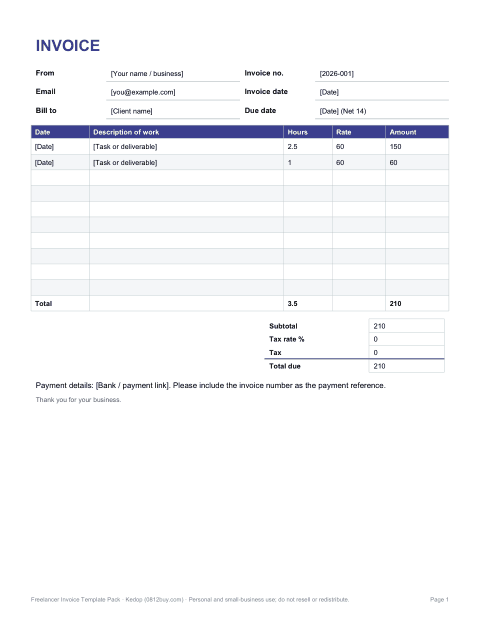
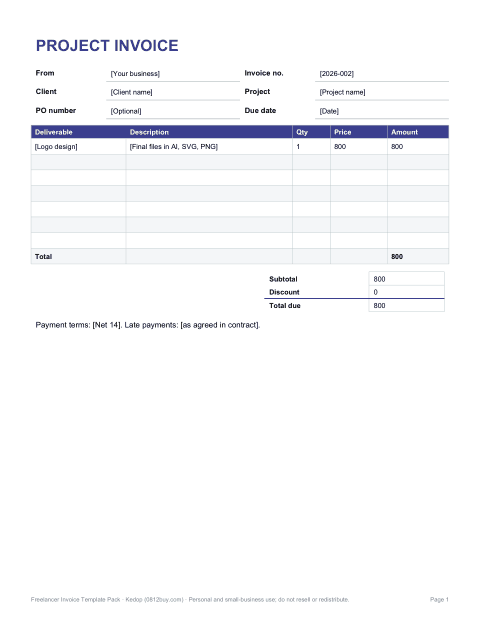
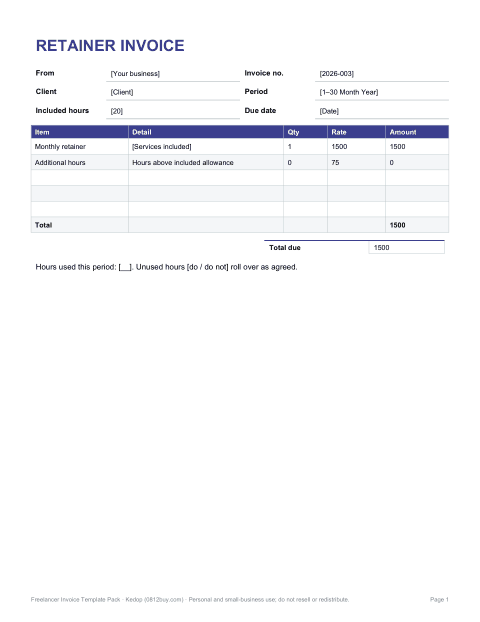
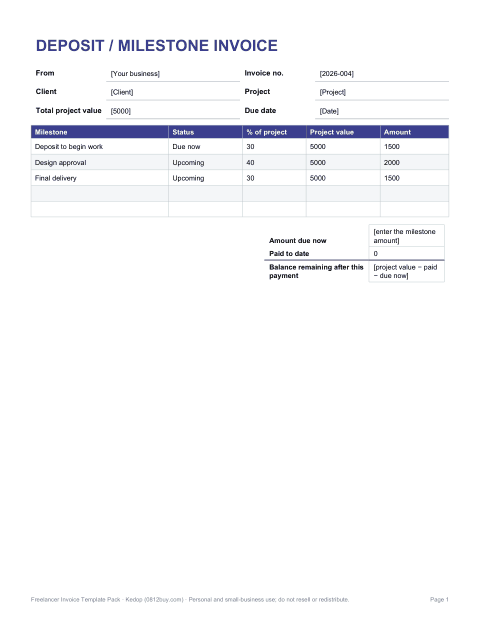
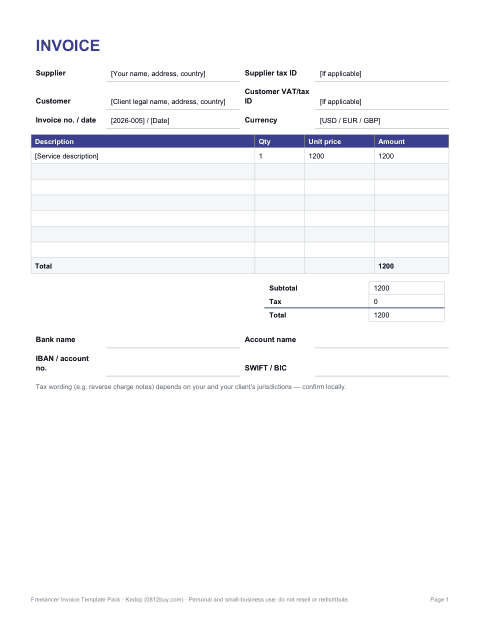
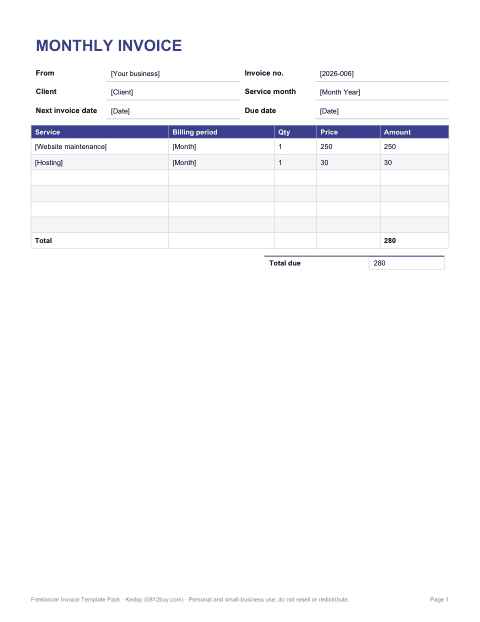
Freelancer Invoice Template Pack
Eight invoice and billing documents for freelancers — each as editable Word, auto-calculating Excel and print-ready PDF.
- Hourly invoice (PDF, DOCX, XLSX)
- Fixed-fee project invoice (PDF, DOCX, XLSX)
- Monthly retainer invoice (PDF, DOCX, XLSX)
- Deposit & milestone invoice (PDF, DOCX, XLSX)
- International invoice (PDF, DOCX, XLSX)
- Recurring monthly invoice (PDF, DOCX, XLSX)
- Timesheet attachment (PDF, DOCX, XLSX)
- Payment reminder letters (PDF, DOCX)
Formats: PDF, DOCX, XLSX. Instant download after payment (link valid 72 hours, up to 5 downloads). AI-assisted: the templates were drafted with AI help and reviewed and laid out by Kedop.
$9.00 USD, one-time
Secure card checkout by Stripe. Full refund within 7 days — see the refund policy and license.
What is in the freelancer invoice pack
Freelancers rarely bill the same way twice. A copywriter may charge by the hour for one client and a flat project fee for another, a developer may take a deposit before starting, and a consultant may bill a monthly retainer. The pack covers each of these situations with its own layout rather than forcing everything into one generic form.
- Hourly invoice — date, task and hours per line, with hours × rate calculated in Excel.
- Fixed-fee project invoice — deliverables listed by milestone with an agreed price per item.
- Retainer invoice — a monthly fee with the period covered, included hours and any overage.
- Deposit and milestone invoice — shows the total project value, the percentage due now and the balance remaining.
- International invoice — currency field, client tax/VAT ID, your tax ID and bank transfer details (IBAN/SWIFT) sections.
- Recurring monthly invoice — for ongoing maintenance, hosting or content subscriptions.
- Timesheet attachment — a detailed log to send with an hourly invoice.
- Payment reminder letter — polite first and second reminder wording for overdue invoices.
Formats and how the files behave
Every template is supplied as a DOCX file you can edit in Microsoft Word, LibreOffice or Pages, and a PDF you can print or fill in by hand. The invoice layouts also come as an XLSX workbook in which line amounts, subtotal, discount, tax and balance due are formulas, so you only type quantities and rates. There are no macros, no add-ins and no online account to sign into.
Page size is US Letter with generous margins so the files also print acceptably on A4. Fonts are standard system fonts, so the documents look the same on another computer without installing anything.
What a freelance invoice should include
Clients and their accounts departments pay faster when an invoice answers every question on one page. Whichever template you use, make sure these items are filled in:
- A unique invoice number that follows a sequence, such as 2026-014.
- Invoice date and payment due date, or clear terms such as “Net 14”.
- Your name or business name, address and contact email.
- The client's legal name, address and, if they ask for it, a purchase order number.
- A description of the work that the client will recognise — the project name and deliverable, not internal shorthand.
- Quantities, rates and line totals, followed by subtotal, any tax and the total due.
- How to pay: bank transfer details, a payment link or accepted methods.
- Late payment terms, if you use them, stated in advance in your contract.
Tax rules differ by country and by client. The templates include optional tax lines, but they do not decide whether you must charge sales tax, VAT or GST. If you are unsure, check with your local tax authority or an accountant.
Choosing the right layout for a job
| Situation | Best template | Why |
|---|---|---|
| Open-ended work billed by time | Hourly invoice + timesheet | Shows exactly what each hour was spent on |
| Logo, website or article with a quoted price | Fixed-fee project invoice | Lists deliverables instead of hours |
| Same service every month | Retainer or recurring invoice | States the period covered and any overage |
| Large project with upfront payment | Deposit and milestone invoice | Shows paid-to-date and remaining balance |
| Client in another country | International invoice | Currency, tax IDs and bank details in one place |
Tips for getting paid on time
Send the invoice the day the work is delivered, while the value is fresh. Put the due date in the email subject as well as on the invoice. Name the file clearly — “Invoice 2026-014 — Your Name — Client” — so it is easy to find in an accounts inbox. Keep a simple register of invoice numbers, dates and amounts; the Excel workbook includes an invoice log sheet for this. If a payment is late, the reminder letter template gives you a neutral first message and a firmer second one that restates the terms.
Customising the templates
Replace the placeholder text in square brackets with your details, add your logo at the top of the Word file, and change the accent colour if you like. In Excel, the rate and tax cells are clearly marked; do not type over the formula cells in the Amount column. You may use the templates for your own freelance business and for invoices you send to your own clients. The license does not allow reselling or sharing the template files themselves.
Frequently asked questions
Can I use these invoices if I am not registered for VAT or sales tax?
Yes. The tax line is optional; delete it or leave it at zero. Whether you must register is a local tax question the templates cannot answer.
Do the Excel files calculate totals?
Yes. Line totals, subtotal, discount, tax and balance due are formulas. You type quantities, hours and rates.
Will they open in Google Docs or Numbers?
The DOCX and XLSX files are standard formats and open in Google Docs/Sheets, LibreOffice and Apple Pages/Numbers, although fonts and spacing can shift slightly outside Microsoft Office.
Can I add my logo?
Yes. Each Word and Excel invoice has a header area where you can insert an image.
Is this legal or tax advice?
No. The templates are practical layouts. Check local invoicing and tax requirements for your country.
Were these made with AI?
The wording and layouts were drafted with AI assistance, then reviewed, corrected and formatted by Kedop. The product page says so because we think you should know.